




 11
11
Placing a Candidate in Podio
SOP Number: YES00050
Effective Date: 4/8/2025
Revision Date: 4/8/2025
Owner: Operations
Review Frequency: {Quarterly}

Purpose
Briefly describe the purpose of this SOP. Explain why this procedure exists and what it aims to achieve.
Some SOPs will have this, some won’t. Will be listed as “Purpose” on old SOPs too.

Responsibilities
List the roles and their responsibilities for this procedure. Be specific about who is responsible for each part of the process.
-
Role 1: Recruiter
-
Role 2: Account Manager

Definitions
Provide definitions for any terms or acronyms used in this SOP that may not be commonly understood.

Placing A Candidate
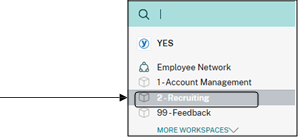
Step 1: Navigate to the “Recruiting” workspace within Podio.
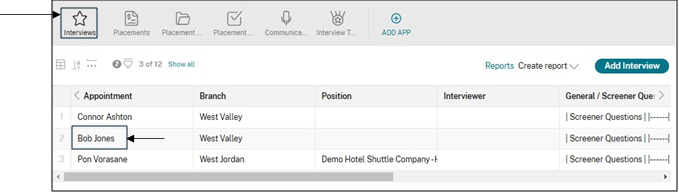
Step 2: Under “Interviews” section, select the candidate you will be interviewing
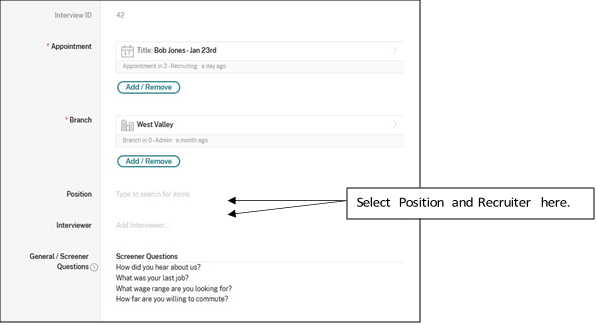
Step 3: After clicking on the name, the Interview panel will open. Select the Position you want to place the candidate on, and ensure you choose yourself as the interviewer (this is only way to remove candidate from Queue, even if you don’t place them).
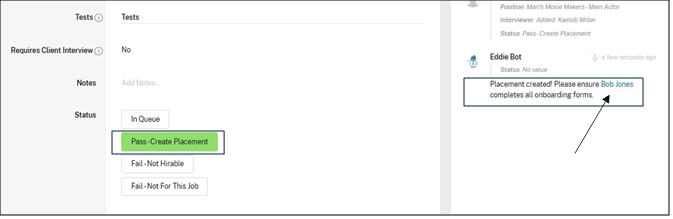
Step 4: After the position and interviewer has been added, you may now click on “Pass – Create Placement”. This will
automatically create a placement and you will see a new activity pop up on the right of the screen. Click the candidates name.
Step 5: This will open up this candidates placement form. Verify that all fields are correct. Remember to verify the following:
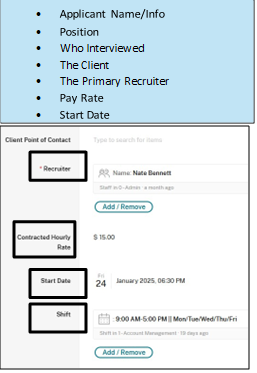
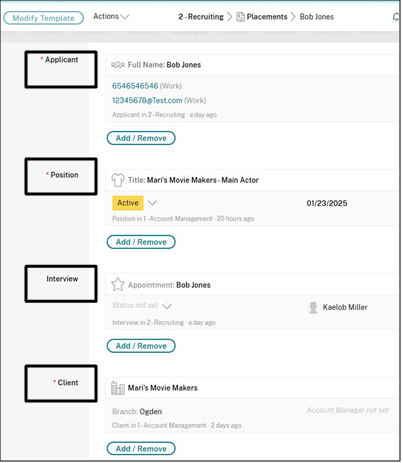
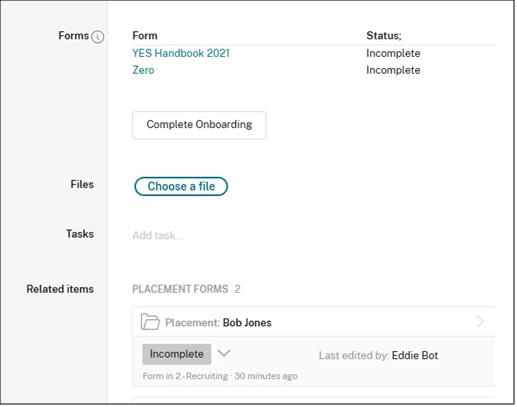
Step 6: Placement forms/Onboarding Forms will be generated and sent to the talent. From here a staff member can click the drop down next to the “Incomplete” and mark them as completed. This will finalize the placement process.
Guidelines and Best Practices {OPTIONAL}
Offer any additional guidelines, tips, or best practices to help with successful execution of this SOP.
Approval and Revision History
|
Version |
Date |
Approved By |
Changes Made |
|
1.0 |
4/8/2025 |
IT , ML |
Initial Creation |

Contact Information
For questions or support related to this SOP, contact:
Role/Department: HR
Email: [email protected]
Extension: 117

