




 10
10
Viewing Associate Details/Info
SOP Number: YES00062
Effective Date: 4/8/2025
Revision Date: 4/8/2025
Owner: Operations
Review Frequency: {Quarterly}

Purpose
Briefly describe the purpose of this SOP. Explain why this procedure exists and what it aims to achieve.
Some SOPs will have this, some won’t. Will be listed as “Purpose” on old SOPs too.

Responsibilities
List the roles and their responsibilities for this procedure. Be specific about who is responsible for each part of the process.
-
Role 1: Recruiter
-
Role 2: Account Manager

Definitions
Provide definitions for any terms or acronyms used in this SOP that may not be commonly understood.

Viewing Associate Details/Info
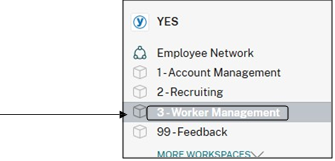
Step 1: Navigate to the “Worker Management” workspace within Podio.
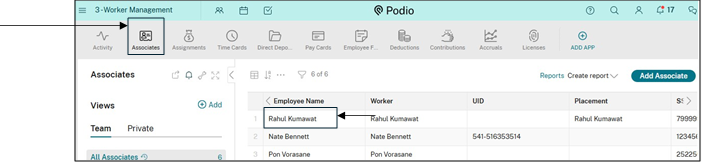
Step 2: Under Worker Management, select “Associates” then select a candidate name to see more details
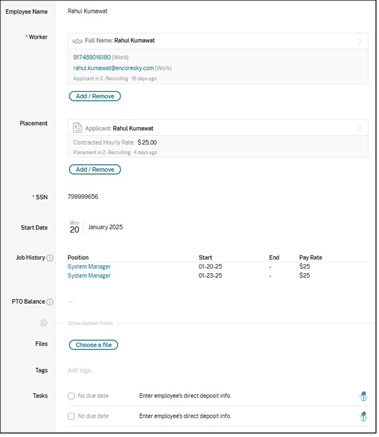 Step 3: You can now view details of the candidate within their profile.
Guidelines and Best Practices {OPTIONAL}
Offer any additional guidelines, tips, or best practices to help with successful execution of this SOP.
Approval and Revision History
|
Version |
Date |
Approved By |
Changes Made |
|
1.0 |
4/8/2025 |
IT , ML |
Initial Creation |

Contact Information
For questions or support related to this SOP, contact:
Role/Department: HR
Email: [email protected]
Extension: 117

