




 13
13
How to Submit a Corrected W-2
SOP Number: YES000039
Effective Date: 4/10/2025
Revision Date: 4/10/2025
Owner: Payroll
Review Frequency: {Quarterly}

Purpose
Corrected W-2s are submitted when we receive updated information from an employee that their name or SSN were incorrect on their W-2. In rare occasions, we also update wages. We have to correct the W-2 in two locations, with the Social Security Administration (SSA) and with the state in which they worked.

Responsibilities
Responsibility of Payroll Staff

Definitions
SSN: Social Security Number

HOW TO SUBMIT A CORRECTED W-2
CORRECTING THE W-2 WITH THE SSA:
|
Web Address: |
|
|
Sign in to ID.me: |
|
|
Password: |
Lwyddtbl1! (Two Factor auth: Reach out to Nick for the code) |
Once you agree to the terms of service make sure you are redirected to this page.
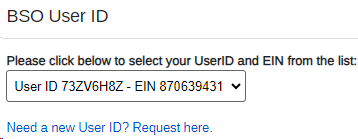
**If you are not redirected here, please reach out to Nick for further instructions!**
-
Once you’ve logged in successfully, you’ll click “Report Wages” -> W-2c Online.

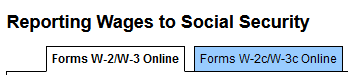
-
Create & Resume form W2c
-
Select Year that the correction needs to be for & K & R Investments
-
If there are multiple years, you need to do a separate one for each year.
-
Don’t select any other boxes on this page; Continue.
-
Enter Nick’s information for our company as the contact person for both the submission and employer.
-
Kind of Payer: 941R
-
Kind of Employer: None Apply; Continue.
-
This is where we update all the information needed. If you’re only updating the SSN or name, it will be simple.
-
Check the box at the top that states “Corrected W-2 Name/SSN” (section “e”)
-
Fill in all required pieces (any with a red * next to it as well as previously used name and SSN), entering both the incorrect and correct information in the designated spaces. (Use info given on SSN for name and Classic for address)
-
Scroll to the bottom, Save & Go to W-2c List.
-
Verify and continue; select full SSNs will be fully displayed and continue; on the next 3 pages, then attest that we want to submit this corrected form and submit.
-
Click Okay twice and print and save a PDF version of this corrected form.
-
Send a copy via mail of Copy2, Copy C and Copy B to the employee with the corrected W-2 letter found in SharePoint (print on company letter head)
CORRECTING THE W-2 WITH THE STATE OF UTAH:
|
Web Address: |
|
|
User ID: |
Youremployment |
|
Password: |
3Seven44 (Two Factor Auth: Reach out to Nick for the code) |
The steps for the State are similar to the steps from the SSA, just a bit simpler.
If they worked in a state other than Utah, please reach out to Alison and Nick to confirm if we pay employment taxes to that state and how to submit their corrections if so.
-
On the Right-hand side of this site (in the “Home” tab), at the bottom in the “Account” Section select “File W-2s, 1099s…etc.”
-
Select W-2/W-2C
-
Under W-2C (on the right) select “Manual Entry”
-
Enter YES information FEIN: 870639431 Account ID: 12460843-002WTH
Name: Your Employment Solutions
-
+Add W2C; in the pop up Enter the employee information. This is where you will update the name, make sure to put both the incorrect previously reported info in, as well as the correct; Add.
-
Back on the previous screen, click next then Yes
And that’s it! No need to print the confirmation for this one or send anything to the employee.
Once corrections are complete make sure to:
-
Leave notes in the employee's file including a copy of the corrected W2 forms (PAGES 2,4,5) & letter mailed and a copy of the original W-2
To print the original W-2 go to Reports in CLASSIC
Please note that the W2 will only print using the original information (incorrect) Use the example below to print. Making sure to Include Electronic W2, show complete SSN & Show CORRECTED (Enter the incorrect SSN with no dashes)
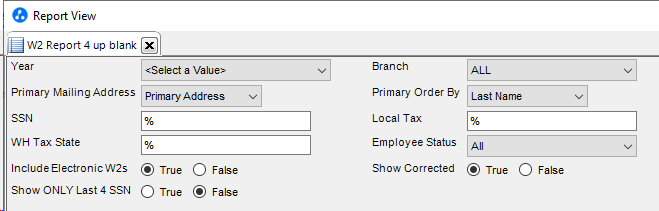
(Add how to add Doc to employee file in BOLD and in Activities)
-
If applicable update Name/SSN Change Tracker in SharePoint SSN- Name Change Tracker.xlsx
-
Complete the HR portion of the SSN/Name form and save to employee’s file
-
Save corrections in Corrected W2’s found in SharePoint Corrected W-2 (file downloaded from SSA site—link provided goes to the ARCHIVE)
-
Add notes to the Payroll Weekly Tracker in the Late HRS & Errors
-
Complete W-2 Letter (if you haven’t done so already)
-
Follow up with recruiter who submitted request on resolution.
Approval and Revision History
|
Version |
Date |
Approved By |
Changes Made |
|
1.0 |
4/24/2025 |
IT , ML |
Initial Creation |

Contact Information
For questions or support related to this SOP, contact:
Role/Department: HR
Email: [email protected]
Extension: 803

