




 13
13
Key Bank Daily Audit Listings
SOP Number: YES00042
Effective Date: 4/10/2025
Revision Date: 4/10/2025
Owner: Payroll
Review Frequency: {Quarterly}

Purpose
This SOP provides a walk through and explanation for viewing and auditing Key Bank reversals, corrections, and returns so we can keep our system data up to date and make sure any returned funds are repaid out to the employee.

Responsibilities
Responsibility of the Payroll Staff
Sign in to Key Bank
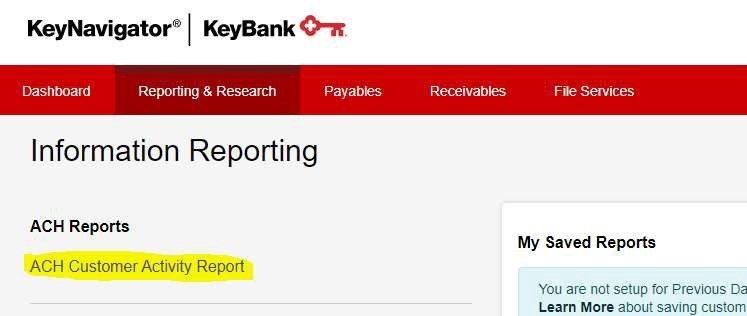
Reporting & Research – Information Reporting – ACH Customer Activity Report
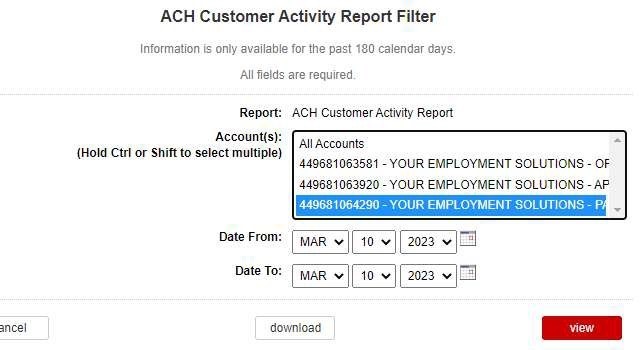
Go to Filter –

Select 449681063581 – YOUR EMPLOYMENT SOLUTIONS – OPERATING – View (do not adjust dates, the dates are automatically set to the prior business day, which is the most recent report we can see).
Adjustment Activity - will usually list all reversals submitted and completed the prior day. We can check here to ensure that reversed funds have been returned to us.
Notifications of Change – This will list any account or routing number changes that we must make, and that were caught by the employee’s bank. The employee’s name will be listed, and the correction needed will be stated here. Correct the employee’s direct deposit information with the information provided here and be sure to leave a note in the employee’s BOLD profile stating that we have made the change to their direct deposit per the bank’s request.
Items Returned – This will list any transactions returned to us, with or without a reversal due to invalid account information. This will list the employee’s name, account information, amount of the transaction and the reason for the check being returned. Void any checks listed here (if not voided already) and be sure to Generate Original Pay Units in Avionte Classic.
Approval and Revision History
|
Version |
Date |
Approved By |
Changes Made |
|
1.0 |
4/24/2025 |
IT , ML |
Initial Creation |

Contact Information
For questions or support related to this SOP, contact:
Role/Department: HR
Email: [email protected]
Extension: 803

