




 39
39
Changing Name and Social Security Number Ticket Process
SOP Number: YES00009
Effective Date: 4/10/2025
Revision Date: 4/10/2025
Owner: Payroll
Review Frequency: {Quarterly}

Purpose
In an effort for HR to manage name change and SSN changes more efficiently, we’ve created a support portal for these to be submitted to allow us to track the amount of time it takes for us to correct them, as well as any common trends we see with the corrections.
Responsibilities
Recruiter

Definitions
SSN: Social Security Number

NAME CHANGE/SSN CHANGE TICKET PROCESS
|
Link: |
At the top of the page click “SUBMIT TICKET”.

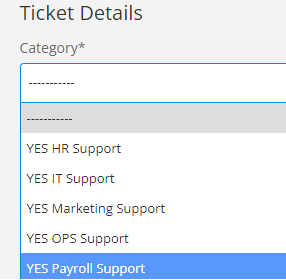
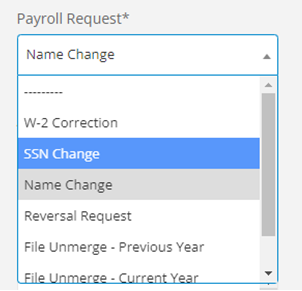
This will allow you to create a new ticket. There are different departments listed here for ticket support. For Name & SSN Changes, please select YES Payroll Support. Select if this is a name change or a SSN change. If it is BOTH, please submit a ticket for each (two tickets).
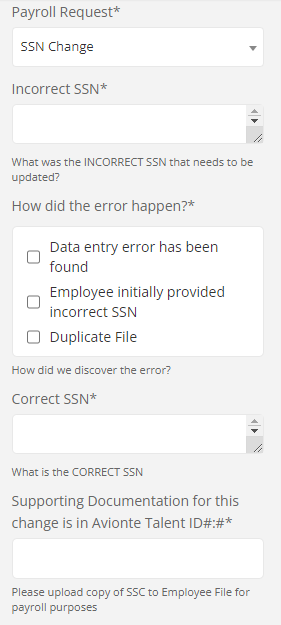 Follow the steps listed in the ticket details including:
-
Incorrect Name(s)
-
What is the original name/SSN on the file
-
How the error happened
-
How did we discover the error?
-
The Correct Name/SSN
-
What is the correct name/SSN that should be listed
-
In which Avionte Talent ID we can find supporting documentation for the change.
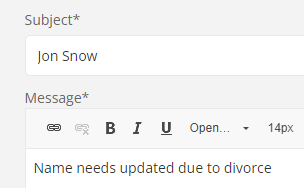
SUBJECT & MESSAGE: In the Subject and Message included in the ticket, please list the employee’s name as the subject, and the reason for the change in the message.
You will also have the ability to attach any files you would like. If you haven’t uploaded the supporting documentation to the employee file (a copy of the SSC for payroll purposes is required for both changes), please attach it to the ticket.
DUE DATE: Please select a week from the date you’re submitting the ticket.
**Please enter your information as the contact Details, NOT the employee. **
Approval and Revision History
|
Version |
Date |
Approved By |
Changes Made |
|
1.0 |
4/24/2025 |
IT , ML |
Initial Creation |

Contact Information
For questions or support related to this SOP, contact:
Role/Department: HR
Email: [email protected]
Extension: 803

