




 11
11
Child Support Garnishment
SOP Number: YES00010
Effective Date: 12/31/2024
Revision Date: 12/31/2024
Owner: Operations
Review Frequency: [Quarterly]
Purpose
Walk through of how to handle child support garnishments received by various state reporting agencies
Responsibilities
Responsibility of payroll team members
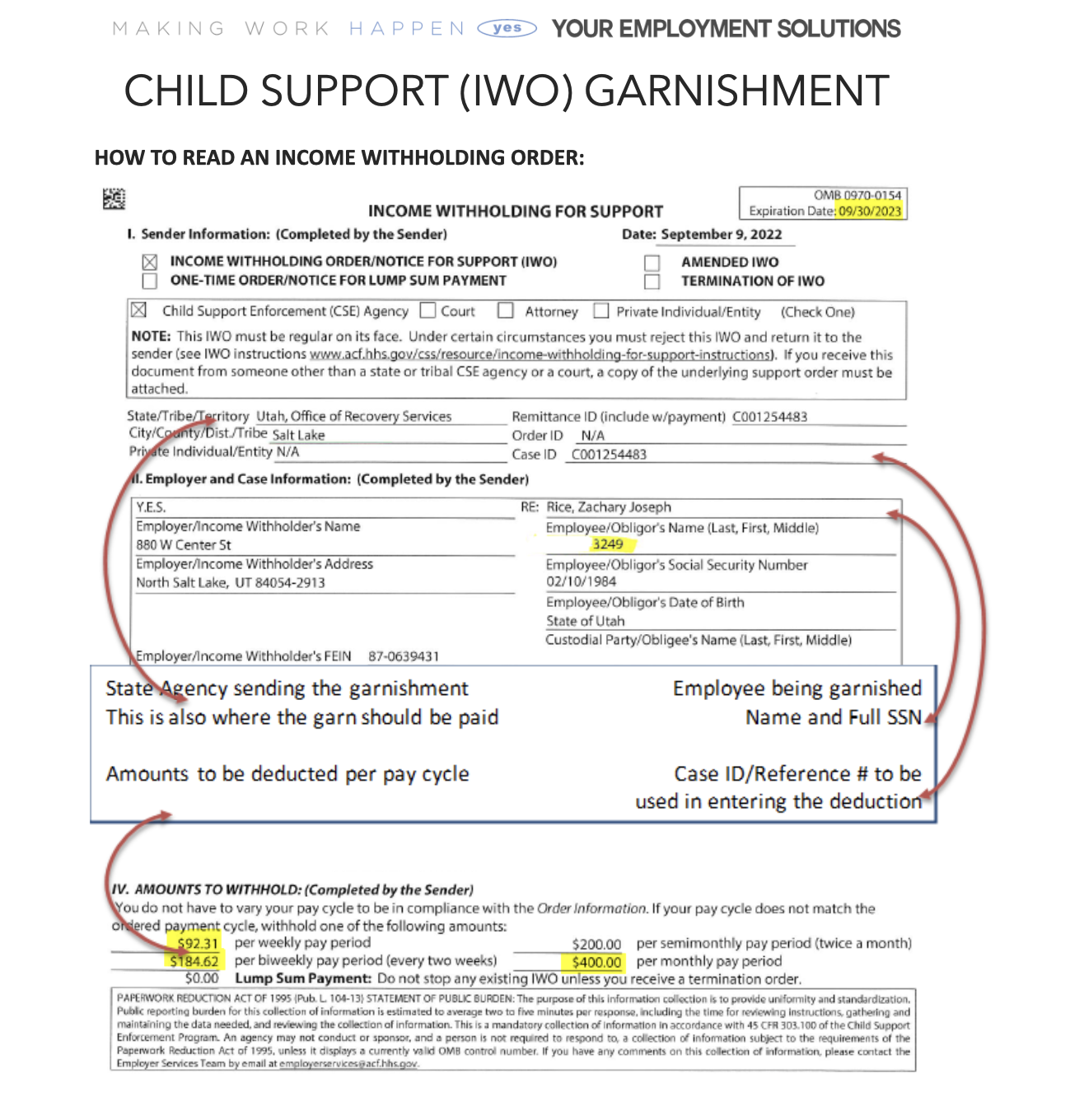
-
Find the employee in Avionte Classic, but searching last 4 or name.
-
Review if the employee is currently working, and if so, if the client they are working at is paying weekly or bi-weekly.
ENTERING AN INCOME WITHHOLDING ORDER:
With the employee pulled up in Avionte Classic, find the Deduction section in the Employee Subtree (Employee Sub Tree -> Payroll -> Deduction)
 BRAND NEW DEDUCTION:
-
At the top of the screen, click
-
Referencing the Child Support order from the state, fill out the deduction:
-
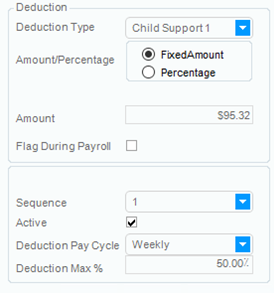 Deduction Type: Should always be “Child Support #”
-
Amount Percentage: Fixed Amount always
-
Amount: This amount needs to match the “AMOUNTS TO WITHHOLD” at the bottom of the order. Take into account how often the employee is paid.
-
Deduction Pay Cycle: Match the employee’s pay cycle
-
Deduction Match %: 50% always. We cannot take more than 50% of wages for child support.
-
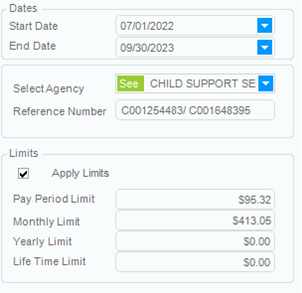
Start & End Date: Start date will be the day the order was input, End Date is the expiration date listed in the top right corner of the garnishment paperwork.
-
Agency: Select the state agency listed on the second page where to remit payments to.
i.e. for Utah, select Child Support Services (ensuring UT address)
-
Reference Number: Enter the orders case ID for the reference #.
-
Limits: Enter the pay period limit and a monthly limit.

-
Click to save the information.
UPDATING DEDUCTIONS:
When you receive an amended deduction form, we want to update it as soon as possible. You’ll follow all the same steps from how to enter a child support garnishment, and simply update the information to match the most recent deduction form.
Once updated, ensure you’re entering a message to document the change.
MULTIPLE IWOs:
For one state: If you receive multiple IWO for one person for the same state but different children, add the totals up for each week’s deductions and enter the total amount of the deductions added together as the amount to be withheld each pay period.
For multiple states: You’ll need to enter separate deductions for each state, but keep in mind we can’t take more than 50% total of the employee’s income. If it’s only two states, the percentage amount listed on the deduction in Avionte, should be 25% each, instead of 50%.
TERMINATION NOTICES:
Sometime when we received deduction forms, the employee is no longer working. The last page in most Income Withholding Orders features a termination notification that will look similar to Utah’s.
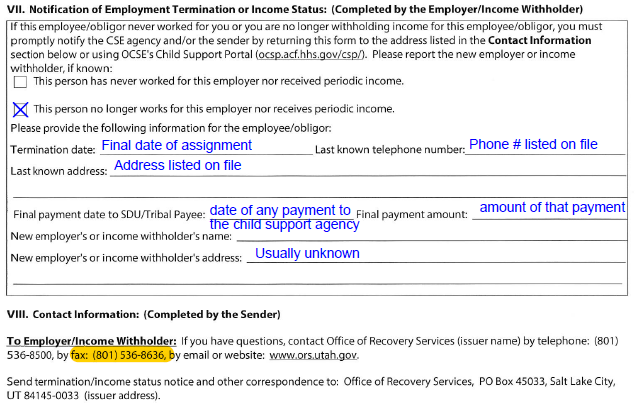
This can be filled out with information found in the employee’s file.
Approval and Revision History
|
Version |
Date |
Approved By |
Changes Made |
|
1.0 |
4/24/2025 |
IT , ML |
Initial Creation |
Contact Information
For questions or support related to this SOP, contact:
Role/Department: HR
Email: [email protected]
Extension: 803

