




 22
22
Create admin in TimeStation
SOP Number: YES00018
Effective Date: 12/19/2024
Revision Date: 12/19/2024
Owner: Operations
Review Frequency: [Quarterly]

Responsibilities
List the roles and their responsibilities for this procedure. Be specific about who is responsible for each part of the process.
-
Role 1: Recruiter
-
Role 2: Account Manager

Definitions
Provide definitions for any terms or acronyms used in this SOP that may not be commonly understood.

Procedure Steps
Create admin in TimeStation
-
Log into time station at timestation.com
-
From the main navigation bar click on settings.

-
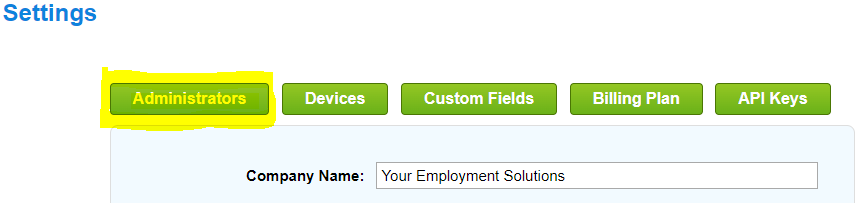
From the settings screen click on Administrators.
-
Click the green “+ Create New Administrator”
-
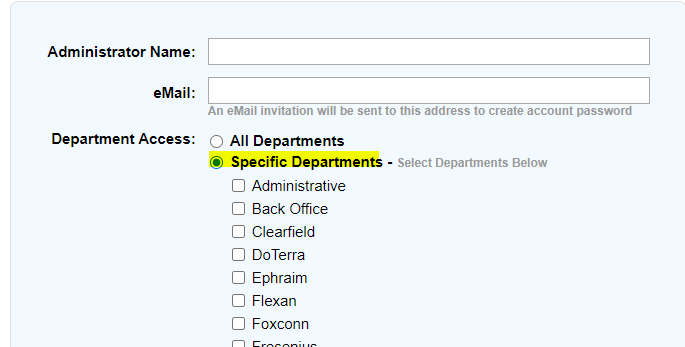
Set the admins name, and email (double check the email as this is where the setup email will be sent to).
-
In department access, if it is for a client, check the Specific Departments radio button and select their departments.
-
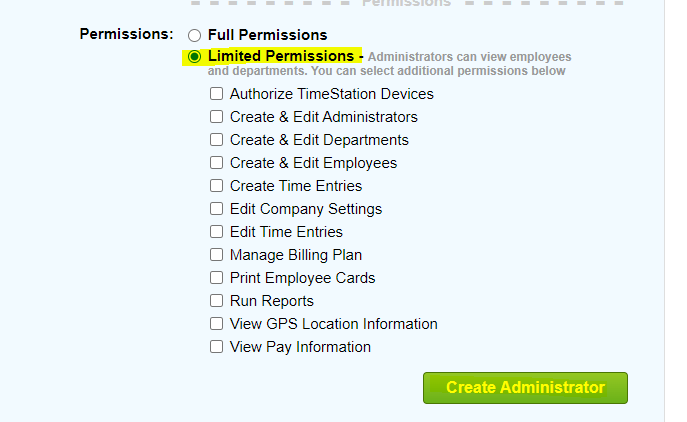
If user does not need full permissions, select the Limited Permissions radio button then click Create Administrator.

Guidelines and Best Practices {OPTIONAL}
Offer any additional guidelines, tips, or best practices to help with successful execution of this SOP.

Approval and Revision History
|
Version |
Date |
Approved By |
Changes Made |
|
1.0 |
12/19/2024 |
IT , ML |
Initial Creation |

Contact Information
For questions or support related to this SOP, contact:
Role/Department: Operations
Email: [email protected]
Extension: 703

